
 TrustView Documentation
6. API
6.1. API keys
You can generate any number of API keys under Settings Manage API keys.
These API keys will only be shown once and thereafter only stored as a one-way hash in the database, so remember to take note of the API key(s) when shown the first time.
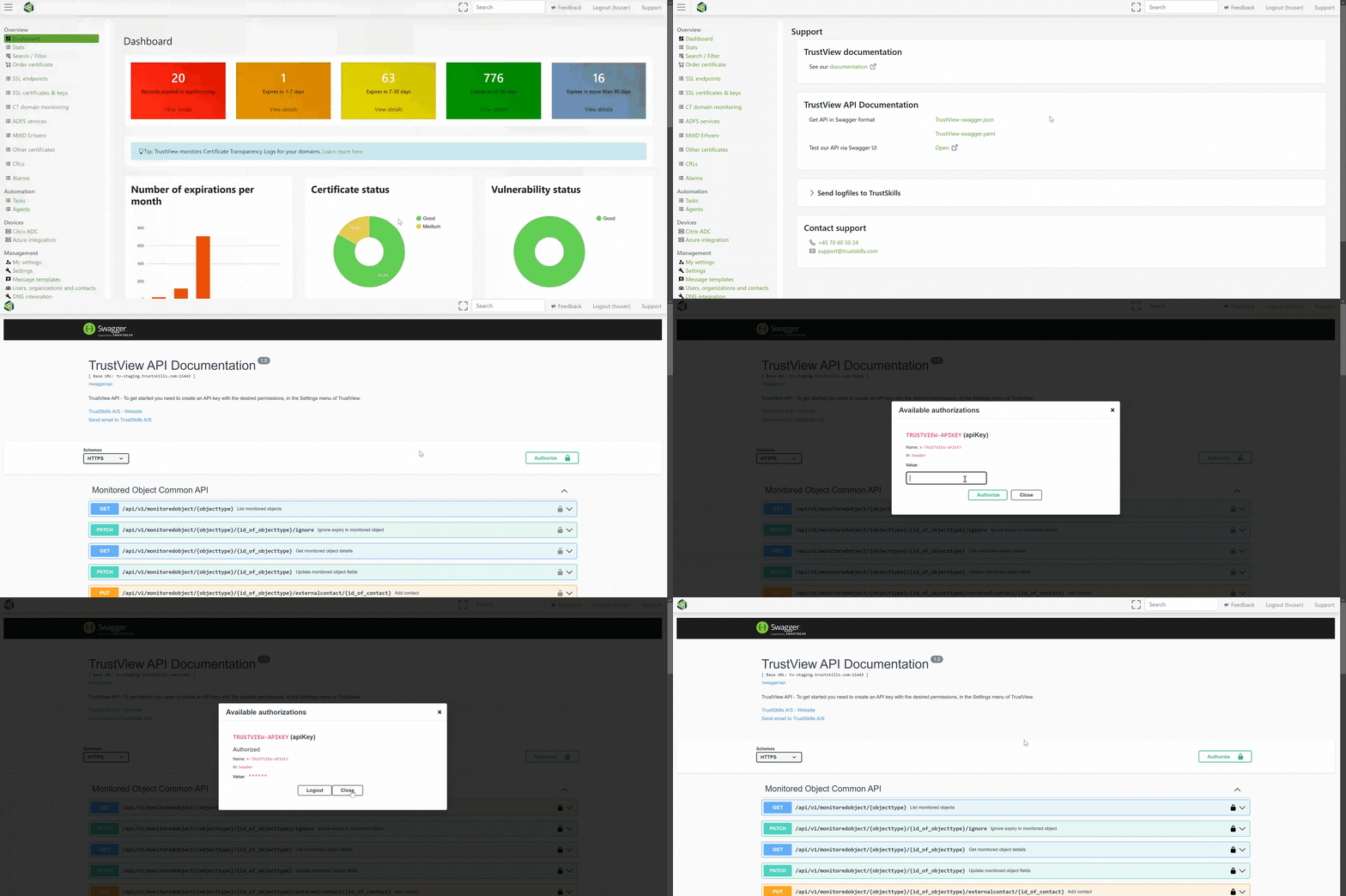
The current API (v1) is documented in Swagger UI inside TrustView, under the Support section,
in the upper right corner of the top navigation of TrustView. The Legacy API described further down this
page is not included in Swagger UI.
Important
Use a generated API key with valid permissions to authorize the Swagger UI,
to be able to test and perform API calls directly from TrustView. API calls may fail if the relevant permissions are not
set for the API key used to authorize Swagger UI. The API key is sent as the X-TRUSTVIEW-APIKEY header.
Note
Repeated failed attempts to authorize with an API key are rate limited, so a burst of authorization failures while testing will be throttled rather than indicating a problem with the API itself.
6.2. Legacy API
Danger
It is recommended to avoid setting up these API handles in a production workflow, as they will be moved to the new API framework and Swagger UI in the future, and therefore changes will inevitably occur.
6.3. Certificate deletion
TrustView allows you to delete certificates in the other category by using API calls.
The deletion API has the following URL:
1DELETE trustview.your-url.org/api/monitoredcertificates/delete
The parameters for the certificate deletion should be included in a JSON format similar to this:
 1 {"apikey":"x4309sdfm",
 2 "certificate":"MIIFzTCCBLWgAwIBAgIQDueitDozhMm2oAZlUslm+jANBgkqhkiG9w0BAQsFADB1
 3 MQswCQYDVQQGEwJVUzEVMBMGA1UEChMMRGlnaUNlcnQgSW5jMRkwFwYDVQQLExB3
 4 d3cuZGlnaWNlcnQuY29tMTQwMgYDVQQDEytEaWdpQ2VydCBTSEEyIEV4dGVuZGVk
 5 IFZhbGlkYXRpb24gU2VydmVyIENBMB4XDTE0MTEyNjAwMDAwMFoXDTE1MTIwMTEy
 6 MDAwMFowgeMxHTAbBgNVBA8MFFByaXZhdGUgT3JnYW5pemF0aW9uMRMwEQYLKwYB
 7 BAGCNzwCAQMTAkRLMREwDwYDVQQFEwgzNTQ2Nzk1NTEhMB8GA1UECRMYSW5nZSBM
 8 ZWhtYW5ucyBHYWRlIDEwLCA2MQ0wCwYDVQQREwQ4MDAwMQswCQYDVQQGEwJESzEP
 9 MA0GA1UECBMGQWFyaHVzMREwDwYDVQQHEwhBYXJodXMgQzEYMBYGA1UEChMPVFJV
10 U1RTS0lMTFMgQXBTMR0wGwYDVQQDExR2aWV3LnRydXN0c2tpbGxzLmNvbTCCASIw
11 DQYJKoZIhvcNAQEBBQADggEPADCCAQoCggEBANMHGEREUGbqnV8iLjGIe01tv8nT
12 WA0fI19bc3AfpYEKUCF0j4w2/1i3LGgGq6vCTbdQ3mbRSroltRMHLbQo/s/KimMj
13 O5NipIyCG2zcSTC//1VAI4skc74sXe5QmwUMynZcn9QlX63LAkIgP3gbC9UwZW1T
14 zG0c1KCyBLq3nnP7lAJwx4HODCGqWrx7Wi1CcvwUe2MGZ5guzWDlo2m7b0VmToal
15 Gf3AKOJmIk1VRMtg7x9QGFT+AHC8pvI2v+3J4AMYZ6t2Yc94RfwHUKsiwnS/PZeX
16 HeuCC7YInbZkqG+May7ja70W8xRBh77MCXZ0Kfumyjgud2ajihlrVC7xY7kCAwEA
17 AaOCAegwggHkMB8GA1UdIwQYMBaAFD3TUKXWoK3u80pgCmXTIdT4+NYPMB0GA1Ud
18 DgQWBBTEypXxWBKpTOnfxY4cbE4D/lMFKDAfBgNVHREEGDAWghR2aWV3LnRydXN0
19 c2tpbGxzLmNvbTAOBgNVHQ8BAf8EBAMCBaAwHQYDVR0lBBYwFAYIKwYBBQUHAwEG
20 CCsGAQUFBwMCMHUGA1UdHwRuMGwwNKAyoDCGLmh0dHA6Ly9jcmwzLmRpZ2ljZXJ0
21 LmNvbS9zaGEyLWV2LXNlcnZlci1nMS5jcmwwNKAyoDCGLmh0dHA6Ly9jcmw0LmRp
22 Z2ljZXJ0LmNvbS9zaGEyLWV2LXNlcnZlci1nMS5jcmwwQgYDVR0gBDswOTA3Bglg
23 hkgBhv1sAgEwKjAoBggrBgEFBQcCARYcaHR0cHM6Ly93d3cuZGlnaWNlcnQuY29t
24 L0NQUzCBiAYIKwYBBQUHAQEEfDB6MCQGCCsGAQUFBzABhhhodHRwOi8vb2NzcC5k
25 aWdpY2VydC5jb20wUgYIKwYBBQUHMAKGRmh0dHA6Ly9jYWNlcnRzLmRpZ2ljZXJ0
26 LmNvbS9EaWdpQ2VydFNIQTJFeHRlbmRlZFZhbGlkYXRpb25TZXJ2ZXJDQS5jcnQw
27 DAYDVR0TAQH/BAIwADANBgkqhkiG9w0BAQsFAAOCAQEAVmbxaK32dQNuV5KROTdm
28 WuEjgpzwmJqLbCucdbCYoIpgint2Nae0ss5v09QGy0prhsxbaB3Qc7M6NHVrGqwj
29 qWVPC7rZEPkLMI5dhBxo4M6E5YQKkNTj6ZXVJqKc/RCfa+JchR9kVSVELMmgKeG1
30 08dNQXjkrek1gMZ0nwaU1C1nKoykh2rrJGcRqoHp0TLNDKVPgu1LOEuNerDgVdFl
31 G218FWVrNbGo0+fYTJUqb6Q23nNjM4HO15QtsXCMYnwuXOHq79qjA4RJUHJp5dcT
32 QcBW7sF+nMJuYsXNOuq9poJoT+MZ/0a5dDR9RDKObeBNZzUWFBnZhNRnt0i5hKnA
33 6Q=="
34 }
The API key field is the API key string - this JSON-body field is the older, legacy way to authorize; the
current X-TRUSTVIEW-APIKEY header method described above works for this endpoint too. The certificate
field is the certificate to be deleted, given as base64 text, with or without the surrounding
-----BEGIN CERTIFICATE-----/-----END CERTIFICATE----- markers.
The call will return a status 200 if successful, or an error status and text if not. The error will also be logged.
6.4. Other certificate creation
TrustView allows you to create certificates in the other category (List View of Monitored Objects) by using an API call - the counterpart to the deletion call above.
POST trustview.your-url.org/api/monitoredcertificates
The JSON body must include a certificate field (base64 text, with or without the surrounding
-----BEGIN CERTIFICATE-----/-----END CERTIFICATE----- markers). A name field can also be included -
if left out, TrustView uses the certificate’s CN, or its serial number if no CN is present.
The call will return a status 201 if successful, or an error status and text if not.
6.5. SSL certificate creation
TrustView allows you to create/import SSL certificates by using an API call. This requires an API
key with the Create SSL certificates permission enabled.
POST trustview.your-url.org/api/monitoredsslcertificates
The JSON body must include a certificate field (base64 text, with or without the surrounding
-----BEGIN CERTIFICATE-----/-----END CERTIFICATE----- markers).
The call will return a status 201 if successful, or an error status and text if not.
6.6. SSL certificate checkout
TrustView allows you to check out (download) an already-monitored SSL certificate by using an API call.
POST trustview.your-url.org/api/monitoredsslcertificates/checkout
The JSON body must include:
certificateId- the id of the certificate to check outpassword- the password to protect the private key withkeyStoreType- one ofpkcs12,pem,jksorpfxcomments- optional, recorded on the checkout history entry
If successful, the response body is the keystore file itself (as a binary download); if not, an error status and text are returned instead.
6.7. MitID certificate checkout
TrustView allows you to check out (download) an already-monitored MitID Erhverv (OCES) certificate by using an API call.
POST trustview.your-url.org/api/monitoredocescertificates/checkout
The JSON body must include:
certificateId- the id of the certificate to check outpassword- the password to protect the private key withkeyStoreType- one ofpkcs12orjkscomments- optional, recorded on the checkout history entry
If successful, the response body is the keystore file itself (as a binary download); if not, an error status and text are returned instead.