
 TrustView Documentation
1. Getting started with automation
Automation is a broad topic, and every organisation has a different mix of servers, appliances and services. This page gives a simple overview of how to choose the right way to automate each of them, and what to clarify before you start. The details are on the pages it links to.
1.1. Why automate
Certificates are getting shorter lifetimes - for public SSL/TLS certificates, the maximum lifetime goes down step by step to 47 days by 2029 (see the FAQ). Renewing and installing certificates by hand quickly becomes a lot of work, and a certificate that is forgotten causes an outage. With automation, TrustView renews certificates in time and gets them installed, without anyone having to remember it.
Note
Automation requires a license for the TrustView Automation module. Contact Support for more information.
1.2. Choosing a route
Go through the questions below for each system that needs a certificate - a server, an appliance or a service. The first question you can answer “yes” to gives you the route to use.
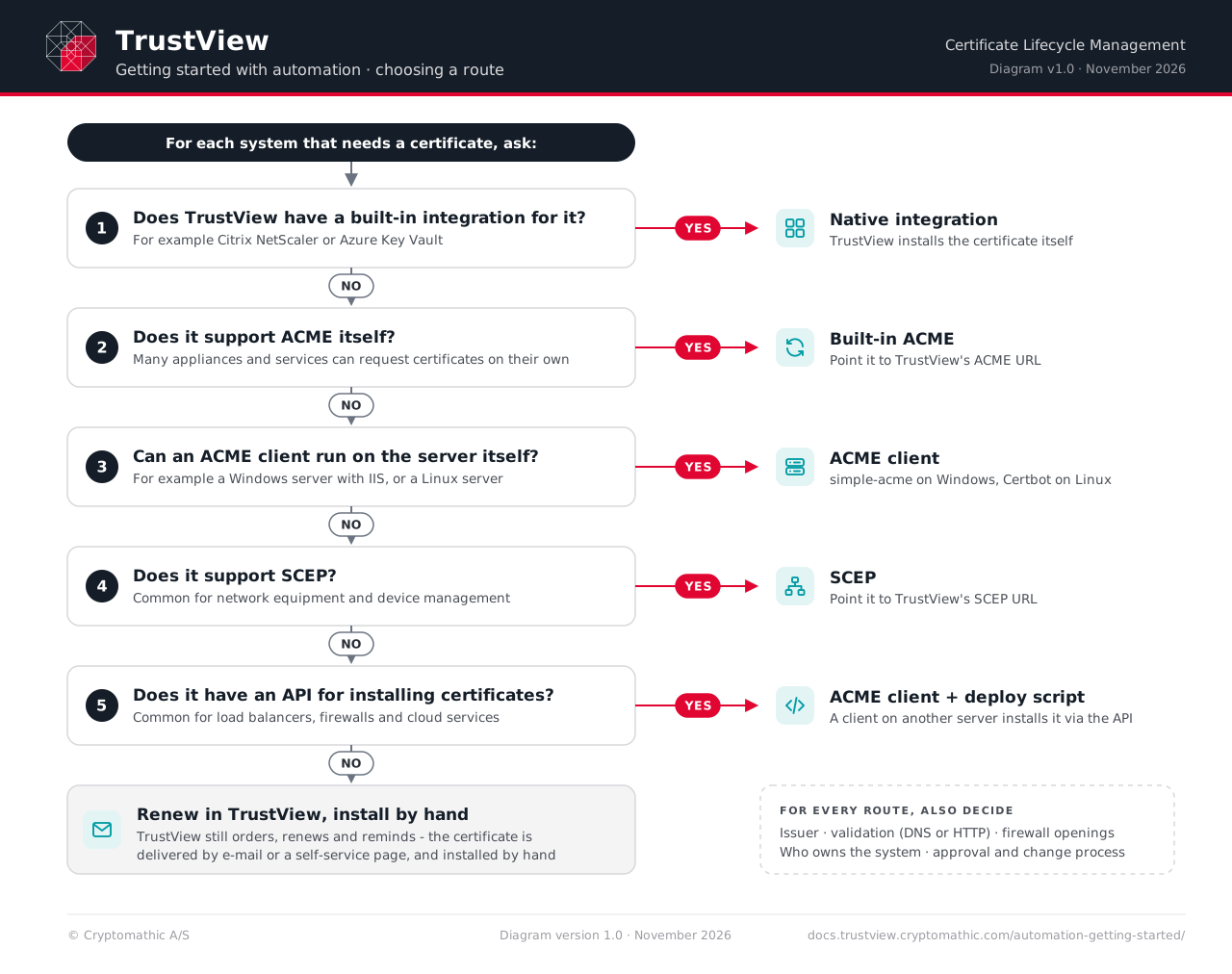
1. Does TrustView have a built-in integration for it?
For Citrix NetScaler and Azure Key Vault, TrustView can install the certificate itself, with no extra software on the system. This is usually the simplest route.
2. Does the system support ACME itself?
ACME is the standard protocol for requesting and renewing certificates automatically. Many appliances, firewalls and cloud or hosting services have it built in - look for “ACME” or “Let’s Encrypt” in their certificate settings. If so, point the system to TrustView’s ACME directory URL instead, and it requests its certificates from TrustView. See FortiGate for an example.
3. Can an ACME client run on the server itself?
On most Windows and Linux servers, a small program - an ACME client - can be installed to request, renew and install the certificate:
Windows -
simple-acme. The most common case is a website in IIS - see simple-acme with IIS. There are also examples for Exchange, ADFS, Tomcat and Java keystores.Linux -
Certbot. See Certbot.See Automation examples for all the examples.
4. Does the system support SCEP?
SCEP is an older protocol for requesting certificates, common in network equipment and device management. If the system supports SCEP but not ACME, see Automating with SCEP.
5. Does the system have an API for installing certificates?
Many load balancers, firewalls and cloud services can’t run an ACME client, but have an API (a programmable interface) for uploading certificates. Then an ACME client on another server can request the certificate, and a small script installs it through the API. See the examples for F5 BIG-IP, Palo Alto and Barracuda WAF.
None of these?
TrustView can still order and renew the certificate and remind you in time, through an Automation task. The new certificate is then delivered by e-mail or as a link to a self-service page - see Certificate Checkout - and installed by hand. Only the last step is manual.
Tip
Start with a single system - often a Windows server with IIS - and get that working before rolling out to the rest. The same setup can then be reused for similar systems.
1.3. Decide early, for every route
Whichever route you choose, these questions come up. Clarifying them first saves time later:
Which issuer? - For example your own internal CA through ADCS, a public CA such as DigiCert ordered through TrustView, or Let’s Encrypt. Internal systems often use ADCS, while public-facing ones need a public CA. See Ordering SSL Certificates.
How are the domains validated? - Public CAs must check that you control the domain. This is easiest to automate with a DNS integration, where TrustView creates the needed DNS records itself. Certificates from ADCS don’t need this.
Which firewall openings are needed? - The systems, or the ACME clients, must be able to reach TrustView, and TrustView must be able to reach the issuer. See Network Requirements.
How are new clients approved? - A new ACME client has to be activated in TrustView before it gets certificates. This can be done by hand, or automatically with activation templates for known networks and domains.
Who owns each system? - Someone needs to receive the notifications if a renewal fails, and to fix it. See Notifications.
Is there a change process? - If changes in production must be approved, agree how automated renewals fit into it before you start.
1.4. Questions to ask for each system
Before setting up automation for a system, it helps to have the answers to these:
What is the system - for example a web server, a load balancer, a firewall or a cloud service - and which product and version?
Who owns it, and who should be notified if something goes wrong?
Which hostnames does the certificate need to cover?
Does it support ACME, SCEP, or an API for installing certificates?
Can software be installed on it - and if not, is there another server nearby where an ACME client could run?
How is the certificate installed today, and does the service need a restart afterwards?
Is it in production, and does a change need to be approved before the certificate is replaced?
1.5. Next steps
Read the Automation page for the details of each route, the examples and the troubleshooting tips.
Check the Network Requirements and make sure the firewall openings are in place.
New customers are offered a workshop that covers TrustView’s features, including automation. For a workshop or other help getting started, contact our Support - they can tell you about the current options.